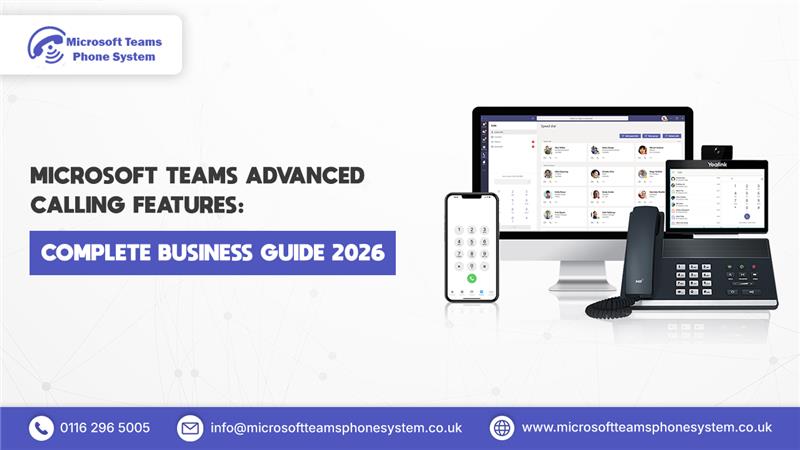
Business calls no longer belong to one office or one desk phone. Teams now work from homes, client sites, and multiple locations but customers still want fast, proper phone answers. Microsoft Teams Advanced Calling Features put business calls right inside the Teams app staff already open daily.
Teams goes beyond chat and meetings. Switch on advanced calling and it handles full business communications calls, messages, files, teamwork all together. Teams connect better, reply to customers quicker, get more done.
This guide covers what Microsoft Teams Advanced Calling Features do, how Teams calling runs, and practical ways organisations handle daily communications better.
What are Microsoft Teams Advanced Calling Features?
Microsoft Teams Advanced Calling Features make Teams work as a proper business phone setup. They cover more than regular calls queues, auto attendants, voicemail, recording, forwarding, and time-based routing all included.
These tools decide how calls arrive, where they go, who answers, and next steps if busy. Microsoft’s cloud handles everything without physical equipment all managed directly in Teams. Companies keep consistent call flow even across locations and devices.
How does Microsoft Teams calling work?
When someone dials your business number, Microsoft Teams receives the call through their cloud network. Teams applies your set rules business hours, queues, or auto attendants and directs the call based on those settings.
The call rings a specific person, enters a queue for the next agent, or reaches an automated menu. Staff answer from laptops, smartphones, or Teams desk phones regardless of location.
No on-site servers or complex wiring are needed. Microsoft’s secure cloud handles everything end-to-end.
How do users make and receive calls in Teams?
Users access the Teams calling tab to make outbound calls, much like any standard phone application. They can dial numbers directly, select from contacts, or click telephone links within emails and meetings.
Incoming calls display as notifications within Teams. A single click enables users to answer, transfer to colleagues, place callers on hold, or divert to voicemail. This streamlined approach ensures efficient call handling throughout demanding workdays.
How Advanced Features Improve Sales and Customer Support
Advanced calling gets calls to the right people fast. Sales routes enquiries straight to available agents. Support uses organised queues for callers. The result is fewer missed opportunities and a better customer experience.
Turn Teams into a full business phone system
Microsoft Teams Advanced Calling Features
Voicemail, Call Recording, and Compliance
Voicemail takes messages whenever users can’t answer. Recording supports training reviews, quality assurance, and regulatory requirements in controlled industries.
Auto Attendant and Call Queues
Auto attendants answer incoming calls and route callers to the proper department. Call queues manage waiting callers in sequence, connecting each to the next available agent no calls left hanging.
Call Transfer, Hold, and Park
Staff transfer calls between colleagues, place callers on hold, or park them for others to retrieve later. Handling tricky enquiries goes much smoother this way.
Team Desk Phones and Mobile Calling
Teams pairs with approved desk phones and mobile applications. Users manage business calls from any location using their usual number.
Call Routing and Business Hours Rules
Call paths adjust based on time, day, or branch location. Customers connect correctly every time, including outside standard hours.
Simultaneous Ring and Call Forwarding
Calls ring several devices together or forward to colleagues or mobiles. Teams remain accessible no matter where members work.
Advanced Call Management in Microsoft Teams
Delegation and Shared Line Appearance
Executives share their line with assistants who answer or transfer calls on their behalf. This streamlines executive support without missing important calls.
Call Analytics and Reporting
Teams delivers reports on call volumes, answer speeds, and patterns. Managers use these insights to refine performance and lift customer service levels.
Emergency Calling and Location Services
Teams handles emergency calls with automatic location data. This ensures responders reach the right place quickly when seconds count.
How Teams supports sales and support teams
Sales teams rely on fast responses. Teams calling ensures that new enquiries ring multiple people or enter a queue, so someone is always available to answer. Support teams use call queues and call recording to manage customer issues in an organised way. Because calls, chat, and meetings all run inside Teams, staff can easily switch between them, share information, and resolve problems faster.
How Microsoft Teams handles call-centre-style calling
Microsoft Teams supports small and medium call-centre operations effectively. Call queues distribute incoming calls equitably among agents, while reporting dashboards display queue lengths and customer wait times clearly. Supervisors access real-time performance monitoring, recorded call reviews, and immediate configuration adjustments during peak volumes.
How to personalise Microsoft Teams calling
Users tailor Teams calling to individual preferences with speed dial setup, favourite contacts, device ringing priorities, and custom notifications. Personalisation maintains focus, accelerates responses, and aligns call management with specific work patterns.
Let users work the way they prefer
How teams collaborate during live calls
Teams call participants engage in simultaneous chat, file sharing, screen presentation, shared documents, and collaborative whiteboards. Problem resolution occurs within the active call rather than requiring application switches or follow-up correspondence.
How Microsoft Teams integrates calling with Microsoft 365
Teams calling synchronises seamlessly with Outlook, calendars, and contacts. Direct calling from emails or meetings includes availability status before connection. Unified Microsoft 365 communications streamline all organisational interactions.
Is Microsoft Teams calling secure and reliable?
Teams leverages Microsoft's global cloud infrastructure engineered for enterprise-scale usage. Calls transmit encrypted across networks with Microsoft 365 account-based access controls. This combination ensures conversation confidentiality and service stability under concurrent high-volume conditions.
Common Microsoft Teams calling issues and how to fix them
Poor internet connections or substandard audio devices cause most problems. Wired broadband, quality headsets, and current Teams versions typically resolve issues. Teams diagnostic reports enable administrators to identify and address problems efficiently.
FAQ's
1. What are Microsoft Teams Advanced Calling Features?
Microsoft Teams Advanced Calling Features are the tools that let Teams handle business phone calls professionally. They include call queues, auto attendants, voicemail, and call routing. These features help companies manage customer and internal calls in one place.
2. Does Microsoft Teams support real phone calls?
Yes, Microsoft Teams supports real external phone calls when advanced calling is enabled. Users can call and receive calls using business phone numbers. Calls work on desktops, mobiles, and Teams desk phones.
3. Can Microsoft Teams replace a traditional phone system?
Microsoft Teams can replace traditional PBX systems for most businesses. It provides cloud-based calling, voicemail, call queues, and call handling without physical phone hardware. Everything runs through Microsoft’s cloud.
4. Is Microsoft Teams calling suitable for sales and support teams?
Yes, Teams calling works well for sales and support teams. Features like call queues, call recording, and routing help manage high call volumes. This ensures customers reach the right people quickly.
5. Is Microsoft Teams calling secure for business use?
Microsoft Teams uses encrypted connections and Microsoft 365 security controls. Calls are protected while travelling across the network. This keeps business conversations private and reliable.
Final thoughts
Microsoft Teams Advanced Calling Features enable modern flexible business telephony without legacy infrastructure. Routing, recording, collaboration, and personalisation capabilities enhance connectivity and customer interactions. For existing Teams users, advanced calling provides the simplest path to comprehensive communication improvements without workflow changes.
If you want to explore more of what Teams can do beyond calling, you may also find our Top 10 Microsoft Teams Features guide useful for understanding how chat, meetings, and collaboration tools fit into the full Teams experience.
Ready to upgrade your business calling in Teams?