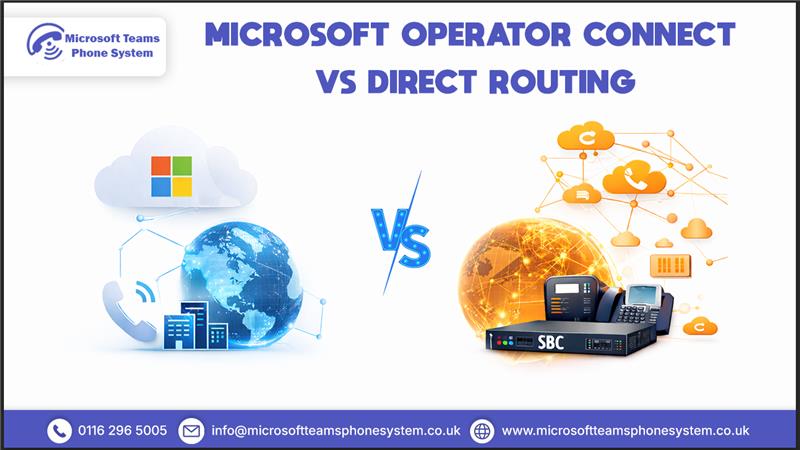
UK businesses keep pushing more operations online these days, and Microsoft Teams has grown well beyond simple collaboration it’s now the go-to platform for calls, meetings, and everyday communication. Yet replacing old phone systems raises an important question for many businesses: Operator Connect or Direct Routing to handle Teams calling properly?
Both options connect Microsoft Teams to the public phone network. Operator Connect keeps things straightforward through certified carriers, while Direct Routing puts you in charge with your own kit and providers. Choosing the wrong setup can quickly increase costs or place unnecessary strain on internal IT teams, sometimes requiring costly reconfiguration later.
With the 2027 PSTN switch-off on the horizon—and plenty of firms already eyeing Microsoft Teams Phone System insights this pick carries real stakes. The right Teams phone system sorts out quicker workflows, trims expenses, smooths out operations, and bends with business growth. This guide cuts through to what each really offers, flags the upsides and drawbacks, and spells out the practical side for UK outfits—so your decision stands firm now and holds up tomorrow.
Why UK Businesses Need to Choose the Right Teams Phone Connection
Microsoft Teams cannot handle external phone calls alone. To reach UK landlines and mobiles, businesses need a PSTN connection leading straight to the Teams Direct Routing vs Operator Connect debate.
Most organisations weigh Microsoft Operator Connect vs Direct Routing. Both carry Microsoft support and future-readiness, but match different company profiles. The key isn’t technical superiority, but fit for your size, budget, and IT setup
What Is Microsoft Operator Connect?
Operator Connect is a straightforward way for businesses to add phone calling to Microsoft Teams. Instead of managing carriers or network infrastructure yourself, you select a Microsoft-certified operator who handles setup, provisioning, and maintenance.
How Operator Connect Works in Microsoft Teams
The operator’s phone network connects directly to Teams, with all configuration done inside the Teams admin centre. No extra hardware or complex networking is required.
From an employee’s perspective, calls work seamlessly inside Teams. From a business perspective, the operator manages technical responsibilities such as number allocation, call routing, and network quality, reducing the burden on IT teams.
Key Benefits of Operator Connect for UK Businesses
Fast Setup with Minimal Technical Effort
UK businesses get Teams calling live fast through Operator Connect—no need for heavy network changes or extra hardware. Everything sets up straight in the Teams admin centre. Teams start dialling right away, skipping those long waits.
No On-Site Hardware or Complex Configuration
Operator Connect skips the on-site gear that older systems force on you. No installation headaches. Less maintenance pulls. IT teams shift focus to what matters most.
Simple Day-to-Day Management
Operators take care of updates and call routes every day. Teams users just pick up and call no deep tech dives needed. Keeps things running smooth without constant fixes.
Predictable Costs for Small and Mid-Sized Businesses
Monthly bills stay clear and steady—perfect for smaller firms watching IT spend closely. No surprise charges pop up. Makes budgeting dead simple.
Businesses looking for a fast, low-complexity way to enable Teams calling often choose Operator Connect.
Limitations of Operator Connect
- Less flexibility for complex call routing
- Limited integration with legacy phone systems
- Fewer customisation options compared to Direct Routing
For small and growing businesses, these limits rarely present an issue. For complex environments, they might.
What Is Microsoft Teams Direct Routing?
Microsoft Teams Direct Routing allows businesses to connect Microsoft Teams to the public phone network using any compatible carrier and a Session Border Controller (SBC). This setup gives organisations full control over call routing, carrier choice, and integration with existing or legacy phone systems.
Direct Routing is commonly used by larger or more complex businesses that need advanced call handling, multi-site connectivity, or flexibility beyond standard Teams calling options.
How Direct Routing Connects Teams to Phone Lines
Teams links to your picked provider through an SBC on-site or cloud-based, whatever fits. This enables advanced call routing, multi-site connectivity, and integration with legacy phone systems. Your IT crew or outside help handles the ongoing watch, though.
Bigger outfits or those with tricky phone needs lean towards Direct Routing. Here, the extra control beats out the setup time and upkeep hands down
Benefits of Direct Routing for Businesses
Greater Control over Call Routing and Features
Direct Routing hands businesses complete say on call handling. Set up your own routing rules, tailor call flows, and add advanced extras that match tough business demands.
Freedom to Choose or Retain Existing Carriers
Stick with your favoured telecom partners or swap them out whenever it suits. Negotiate deals, hold onto current numbers, pick based on quality or rates—full choice stays yours.
Better Fit for Complex or Multi-Site Environments
Larger firms with offices scattered about connect everything smoothly. Smart routing keeps call standards even across branches, no matter the spread.
Easier Integration with Legacy Phone Systems
Still running old phone gear? Direct Routing bridges to Teams without a full rip-out. Staff and customers keep things ticking over during the switch.
Direct Routing suits bigger outfits or those needing precise tech setups.
Challenges and Complexity to Consider
More Complex Initial Setup
Expect more work upfront—SBC config and carrier links take time and know-how.
Ongoing Maintenance Required
Regular checks and tweaks fall to your team; nothing runs on autopilot.
Higher Reliance on IT Expertise
Needs solid IT skills in-house or from partners to keep it humming.
Potentially Higher Total Costs over Time
Upfront gear plus upkeep can add up, especially without scale.
Direct Routing packs power, but simplicity isn’t its strong suit.
Microsoft Operator Connect vs Direct Routing: Key Differences
Feature | Operator Connect | Direct Routing |
Setup Time | Fast | Slower and more involved |
Technical Complexity | Low | High |
IT Involvement | Minimal | Ongoing |
Flexibility | Limited | High |
Cost Predictability | High | Varies by setup |
Best For | Small to mid-sized businesses | Large or complex organisations |
This comparison clearly shows which option aligns with different business realities.
Cost Comparison: Operator Connect vs Direct Routing for UK Businesses
Operator Connect: Predictable Monthly Costs
Operator Connect wraps calling into straightforward monthly fees. Operators shoulder the tech side, so UK businesses dodge hidden charges and plan budgets with confidence.
Direct Routing: Variable Costs and Ongoing Management Expenses
Direct Routing might look cheap at first if you’ve got a carrier lined up. Add in SBC hosting, setup, support, and constant tweaks costs climb unless you need that extra control badly.
Which Option Is Right for Your Business?
Small Businesses and Startups
Small outfits want simple Teams calls without tech hassle? Operator Connect fits best. No fuss, steady costs job done.
Growing and Mid-Sized UK Companies
Growing firms stick with Operator Connect in most cases. Only go Direct Routing if you've got IT ready and need custom call tricks.
Large or Complex Organisations
Big players, call centres, or legacy setups pick Direct Routing. The control makes the extra work worth it.
Not sure whether Operator Connect or Direct Routing is right for you?
How the UK PSTN Switch-Off in 2027 Affects This Decision
The UK’s old phone network shuts down in 2027. Firms on legacy lines have to shift to internet calling no choice there.
Operator Connect and Direct Routing both handle the switch fine. It boils down to how much work your team wants to put in for compliance. Pick now what lasts, skip another move later.
Related FAQs:
Is Operator Connect Cheaper than Direct Routing?
Most small and mid-sized UK businesses find Operator Connect more steady on costs. Both need Teams Phone licences, but it cuts tech management and kit expenses budgeting gets simpler.
Can You Switch from Direct Routing to Operator Connect Later?
Yes, firms switch when priorities shift often to ease management or cut IT reliance. Proper planning makes it smooth.
Do You Need In House IT for Direct Routing?
Direct Routing calls for constant tech work: config, checks, fixes. No internal IT? External help bumps costs and hassle long-term.
Is Direct Routing Being Phased Out by Microsoft?
No Microsoft backs Direct Routing right alongside Operator Connect. Both stay open; pick by your tech needs, not any phase-out.
Which Option Is Faster to Deploy for UK Businesses?
Operator Connect rolls out quicker via Teams admin centre. Direct Routing adds SBC setup takes longer, needs know-how.
Which Option Is Better for Complex or Multi-Site Organisations?
Direct Routing fits larger or spread-out firms needing smart routing, old system links, flexibility. Operator Connect stays simple but limits complex cases.
Final Verdict: Operator Connect or Direct Routing?
For most UK businesses, Operator Connect tends to be the smarter, longer-lasting pick for Teams calling quicker to roll out, easier to run day by day, steady costs month to month, no telephony whizz needed on staff. Bigger or trickier outfits still go for Direct Routing when advanced routing, multi-site grip, current carrier deals, or hooking up old phone kit really counts. It’s down to what matches your setup, not just specs: go simple and swift with Operator Connect if that’s you, or take on Direct Routing’s extra work if custom control pays off proper. Nail it early to dodge pricey fixes down the line keeps Teams Phone solid past the 2027 PSTN cut-off.
Find out which Teams calling solution fits your budget and business needs