If your business is still running a traditional PBX, there is a deadline looming. January 2027. That is when Openreach permanently switches off the UK’s analogue PSTN and ISDN networks the very lines most PBX systems depend on to function.
That changes the entire conversation around Microsoft Teams Phone vs traditional PBX. This is no longer a question of preference or budget timing. It is a question of business continuity.
This guide covers everything you need to make a clear, confident decision costs, features, migration, and the mistakes businesses make when leaving it too late.
Key Takeaways
- Core difference: Teams is a unified workspace, Webex is telephony-focused
- Best for most businesses: Microsoft Teams offers better value with Microsoft 365
- Best for enterprise calling: Cisco Webex suits Cisco hardware and high-reliability environments
- Cost impact: Teams is typically more cost-effective for SMBs
- Use case fit: Teams supports hybrid work, Webex fits hardware-based setups
Understanding Microsoft Teams Phone vs Traditional PBX The Core Differences
Both systems connect phone calls.
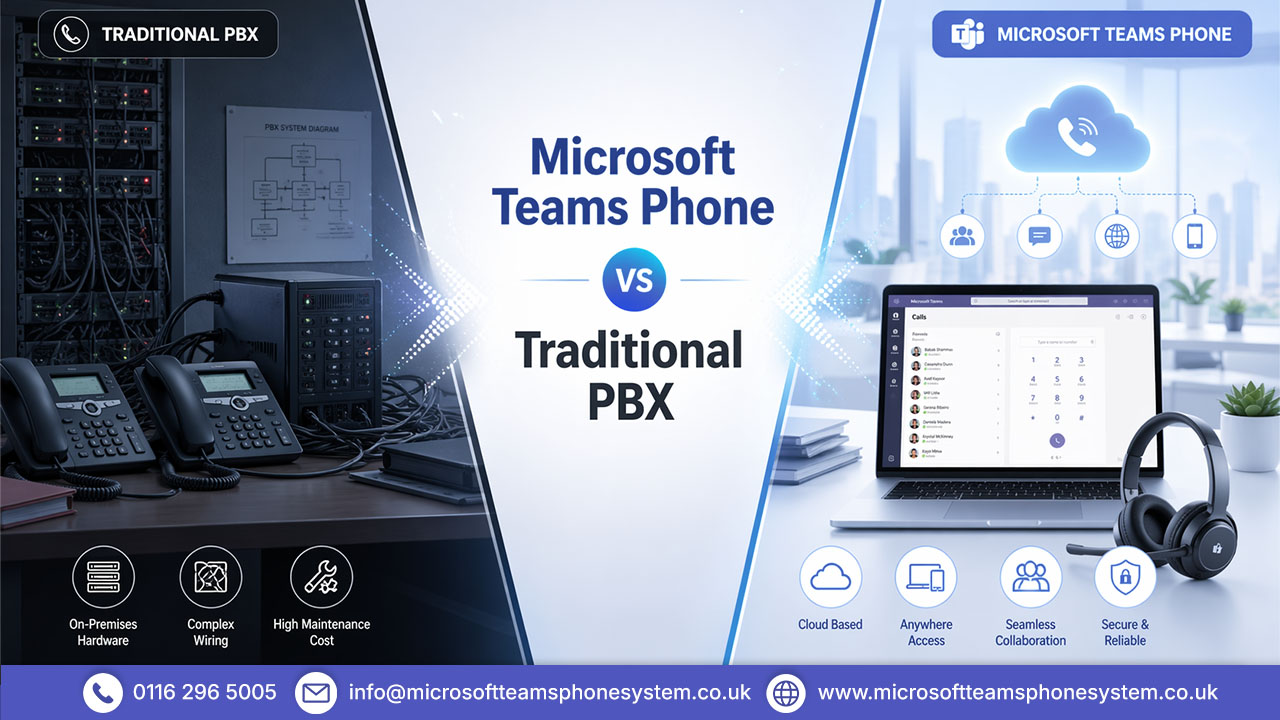
A traditional PBX (Private Branch Exchange) is physical infrastructure hardware installed on your premises, running through copper telephone lines, managed on-site. A Teams Phone system is cloud-native telephony, built directly into Microsoft 365, running over the internet via VoIP (Voice over Internet Protocol).
One was designed for fixed offices and permanent desks. The other was built for a business world that stopped looking like that some years ago.
What Is a Traditional PBX Phone System?
A PBX phone system handles internal and external calls through a private exchange installed on your premises. Desk phones connect to a central unit that manages routing, extensions, voicemail, and basic call handling.
Adding a new user means ordering hardware, arranging installation, and potentially waiting days. Moving offices means a significant logistical undertaking. And if a component fails, you are waiting for an engineer during which time, your phone lines are down.
What Is Microsoft Teams Phone System?
The Teams Phone system brings enterprise-grade calling directly into Microsoft Teams, the platform millions of UK businesses already rely on for meetings, messaging, and collaboration. Calls are routed over the internet via VoIP, and users can pick up and make calls from a laptop, mobile, tablet, or desk phone — from anywhere.
Through Microsoft’s Calling Plans or Direct Routing with a third-party carrier, Teams Phone connects fully to external networks. Your people can call any landline or mobile number exactly as they always have. The difference is there is no box on the wall, no copper line running to the exchange, and no engineer needed when you want to make a change.
Explore Teams setup and benefits
The 2027 PSTN Switch-Off: What It Means
The UK will permanently switch off PSTN and ISDN lines in January 2027. This isn’t an upgrade those networks will stop working completely, with phased migration notices from Openreach ahead of time.
Traditional PBX systems that rely on PSTN/ISDN lines for external calls will lose connectivity unless migrated to IP/SIP or cloud alternatives. IP-PBX and SIP-based systems can continue via internet connectivity.
Microsoft Teams Phone is not dependent on legacy PSTN/ISDN infrastructure. It runs over the internet (with Calling Plans or Direct Routing for PSTN access), so it avoids disruption from the switch-off.
How Each System Actually Works in a Business Environment
How Traditional PBX Operates Day-to-Day
Calls come in through physical lines, hit the on-site exchange, and ring through to the right desk. Straightforward provided everyone is at their desk, in the office, every day.
The cracks show the moment that changes. Remote workers need call forwarding set up manually. Multiple offices need separate PBX units and costly inter-site connections. Adjusting call routing means either knowing the system inside out or calling your support provider. It is not unmanageable, but it requires consistent effort to maintain, and that effort adds up.
How Teams Phone System Handles Calls and Collaboration
Teams Phone works where your people work. A call comes in — it rings on their laptop at home, their mobile on the road, or their handset at the office. They answer, and the caller has no idea there is anything unusual about the setup.
From the admin side, everything lives in a single dashboard. Routing changes, new users, call queue adjustments none of it requires a site visit or a specialist. And because Teams Phone sits inside Microsoft 365, it connects naturally with Outlook, SharePoint, and the broader suite. Voicemails arrive as transcriptions in the inbox. A phone call can become a video meeting in seconds. These are not add-ons — they are part of the same platform.
Key Factors to Compare: Microsoft Teams Phone vs Traditional PBX
Cost and Infrastructure Investment
Traditional PBX costs money before it ever handles a single call. Hardware, installation, cabling, handsets, maintenance contracts the list is long, and the invoices are not small. Larger organisations can easily spend tens of thousands of pounds on infrastructure before going live, with ongoing costs layered on top every year.
Teams Phone flips that model. You pay per user, per month, folded into your existing Microsoft 365 licensing (e.g., E3/E5 + Phone System add-on + Calling Plan; licensing can be complex—review via Microsoft admin center). No servers to procure, no hardware lifecycle to plan for, no callout charges when something needs adjusting. Often cheaper for Microsoft 365-based businesses with moderate usage, though call-heavy operations or add-ons may increase costs.
Scalability and Flexibility for Growing Teams
Growth on a traditional PBX involves procurement. New headsets, new lines, engineer visits, waiting periods. If your business expands quickly or if headcount fluctuates seasonally the physical constraints of on-premise hardware become a real operational problem.
Teams Phone scales through a licence assignment. A new team member is up and running in minutes. Someone leaves, and their number is reallocated just as quickly. For businesses managing hybrid teams, multiple sites, or rapid growth, that agility is not a minor convenience it is a meaningful competitive advantage.
Maintenance, Support and IT Burden
On-premise PBX puts the maintenance responsibility on your business. Firmware updates, fault resolution, configuration changes — all of it demands IT resource or support contract spend. When something breaks at a bad moment, and it will, the disruption is immediate.
Microsoft handles the Teams Phone infrastructure. Security patches, platform updates, and uptime management are Microsoft’s responsibility, backed by enterprise SLAs. Your IT team’s focus shifts away from keeping the lights on and towards actually improving how the business uses its communications tools.
Features, Integration and Collaboration Tools
A traditional PBX makes calls. It does that competently. What it cannot do not without significant additional cost and middleware is connect meaningfully with your CRM, your calendar, your document management system, or your video platform.
Teams Phone is already inside the ecosystem where that work happens. Call data flows into analytics. Voicemails become readable text. Contacts are live from Outlook. The entire communications experience is unified and that unification removes friction that no amount of PBX configuration can replicate.
Pros and Cons at a Glance
Traditional PBX Advantages and Limitations
Pros
- Proven, reliable within office environments
- No internet dependency for core call routing
Cons
- High upfront capital expenditure
- Slow and expensive to scale
- Traditional PSTN/ISDN-dependent systems impacted by 2027 switch-off
- Poor fit for remote and hybrid working
- No native integration with modern productivity tools
Microsoft Teams Phone Advantages and Limitations
Pros
- Predictable monthly subscription no large upfront outlay
- Scales instantly, per user, in minutes
- Works across any device, from any location
- Fully integrated within Microsoft 365
- Not dependent on legacy PSTN/ISDN (unaffected by 2027 switch-off)
- Continuously updated no separate upgrade cycles
Cons
- Requires reliable business-grade internet (QoS, failover essential)
- Brief adjustment period for staff moving from traditional desk phones
- Licensing complexity (E5/add-ons) and potential higher costs for high-volume calls
Evaluate strengths and limitations before choosing
Which Phone System Is Right for Your Business?
When a PBX Phone System Still Makes Sense
If internet connectivity at your location is genuinely unreliable and cannot be improved in the near term, migrating to a cloud-dependent system needs careful planning before any switch is made. Businesses with complex, deeply embedded legacy PBX integrations may also benefit from a phased approach rather than an immediate cutover.
Worth noting, though the 2027 deadline means these are reasons to plan carefully, not reasons to delay indefinitely.
When Teams Phone System Is the Smarter Move
If your business already runs Microsoft 365, manages any level of remote or hybrid working, or is looking at a PBX contract renewal in the next twelve to twenty-four months the answer is fairly clear. Teams Phone offers everything your current system does, within a platform that is already embedded in your daily operations, at a cost model that is simpler to manage and easier to scale.
FAQ's
1. What is the difference between Microsoft Teams Phone and a traditional PBX?
Microsoft Teams Phone is a cloud-based system that runs over the internet and integrates with Microsoft 365. A traditional PBX is an on-site hardware system using physical phone lines. The key difference is flexibility Teams works from anywhere, whilst PBX is tied to a fixed location.
2. Is Microsoft Teams Phone cheaper than a PBX system?
Often yes for Microsoft 365-based businesses with moderate usage. PBX involves upfront hardware, maintenance, and upgrade costs. Teams Phone runs on a per-user subscription, making it more predictable and cost-effective over time.
3. Can Microsoft Teams Phone fully replace a PBX system?
Yes for most standard business needs, including calling, voicemail, and call routing. It supports features like auto-attendants and call queues. More complex setups may need additional configuration or third-party solutions.
4. Does Microsoft Teams Phone work well for remote teams?
Yes, it’s designed for remote and hybrid work environments. Employees can make and receive calls from any device with an internet connection. It removes the need for fixed desk-based phone systems.
5. What are the main drawbacks of a traditional PBX system?
PBX systems involve high hardware and maintenance costs. They are less flexible for remote or hybrid work. The 2027 PSTN switch-off will also impact systems that rely on legacy phone lines.
Conclusion
Traditional PBX is a good one, designed for a working environment that no longer exists for most businesses. Fixed offices, fixed desks, fixed teams. That world has changed, and the infrastructure built for it is struggling to keep up.
Teams Phone was designed for how businesses actually operate now. Hybrid teams, multiple locations, people working across devices and time zones. It does not simply replicate PBX functionality it extends what telephony can do within a platform your people already know. And given the upcoming network changes, the case for staying put has weakened considerably.
Ready to upgrade your communication system